Criteo
AI Marketing Assistant
Adtech
AI
Conversational design
Criteo is a leader in targeted online advertising; their added value lies in audience monetization with an extremely complex algorithm that intelligently identifies consumers. The agent I worked on allows for the creation of sophisticated audiences, enabling brands to precisely target consumers suited to their offerings.
Role
I was the Product designer in charge of the full project.
Tasks
I conducted workshops, mapped the current user experience, created prototype and designed the full experience.
Team
On the Design side, I worked with a user researcher, a content designer and a Design System designer On the Product Side I worked with 2 PM
For the MVP I worked hand in hand with a team of ~8 developers
AI Use
Claude - BenchmarkMarvin AI - synthetizes user interview and surface Insight
NotebookLM/Napkin AI - field exploration
Google Stitch - components ideation
Repplit - early prototype and concept testing
Discovery
We started by interviewing Criteo marketing experts to understand their workflow. Our users were already using LLM tools to get new ideas for their campaigns but it was not linked to Criteo’s Data. Digging into the data we identified a core opportunity around enabling new segment ideas for marketers: While users reported a high satisfaction with the current audience tool, the data showed that it was not used to it full potential; users would often stick with simpler audiences to avoid the complexity of the tools.
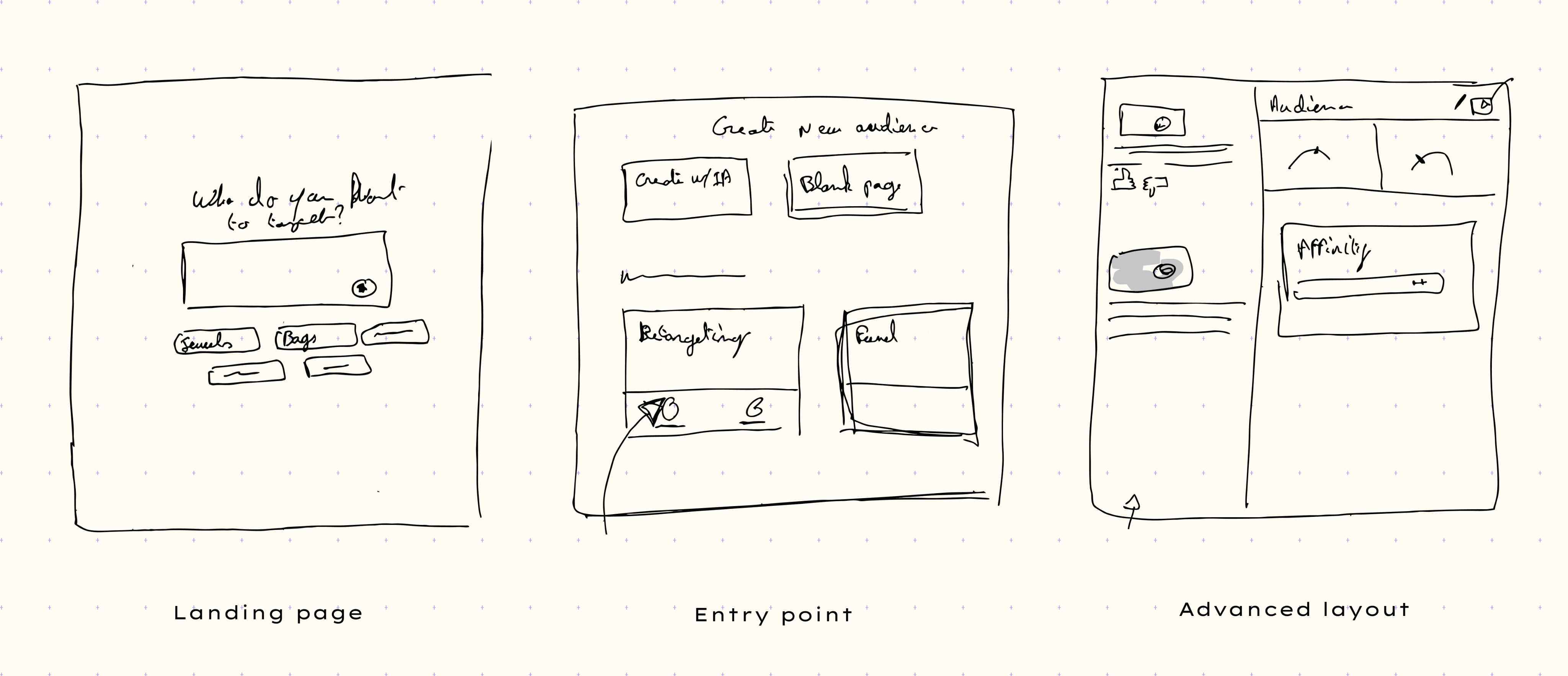
Early sketchs
3 main layouts where prioritized
Landing page
The goal of this page was to clarify what the agent could and could not do, and to encourage users to explore the tool
Entry point
The agent needed to be on the critical path of the users to ensure easy adoption
Advanced layout
To bring the conversation to life, we aimed for a generative layout that would carry graphics and visualization enabling a back and forth with users
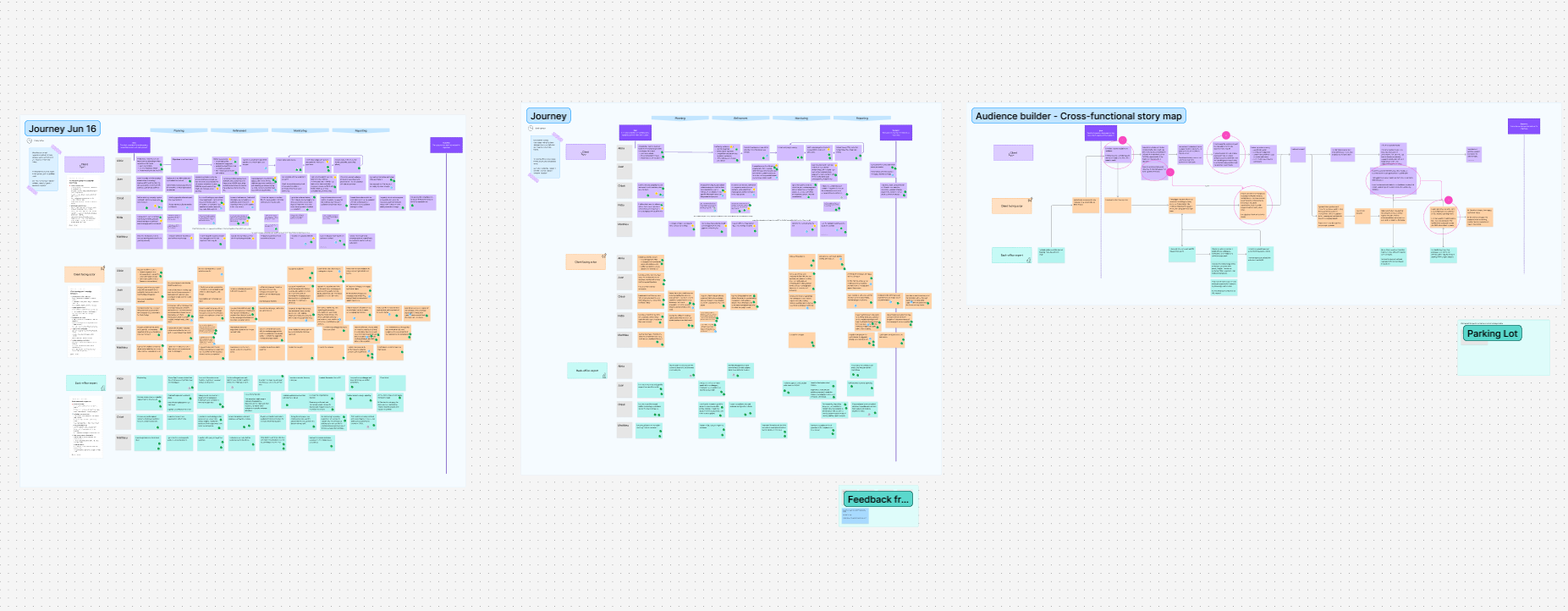
Mapping “Note-n-Map”
Borrowing from the excellent article of Steph Cruchon I led a workshop to build a cross functional story mapping. This allowed us to clearly layout the process of building the audience from the brief to the client receiving the ads.
Mockups
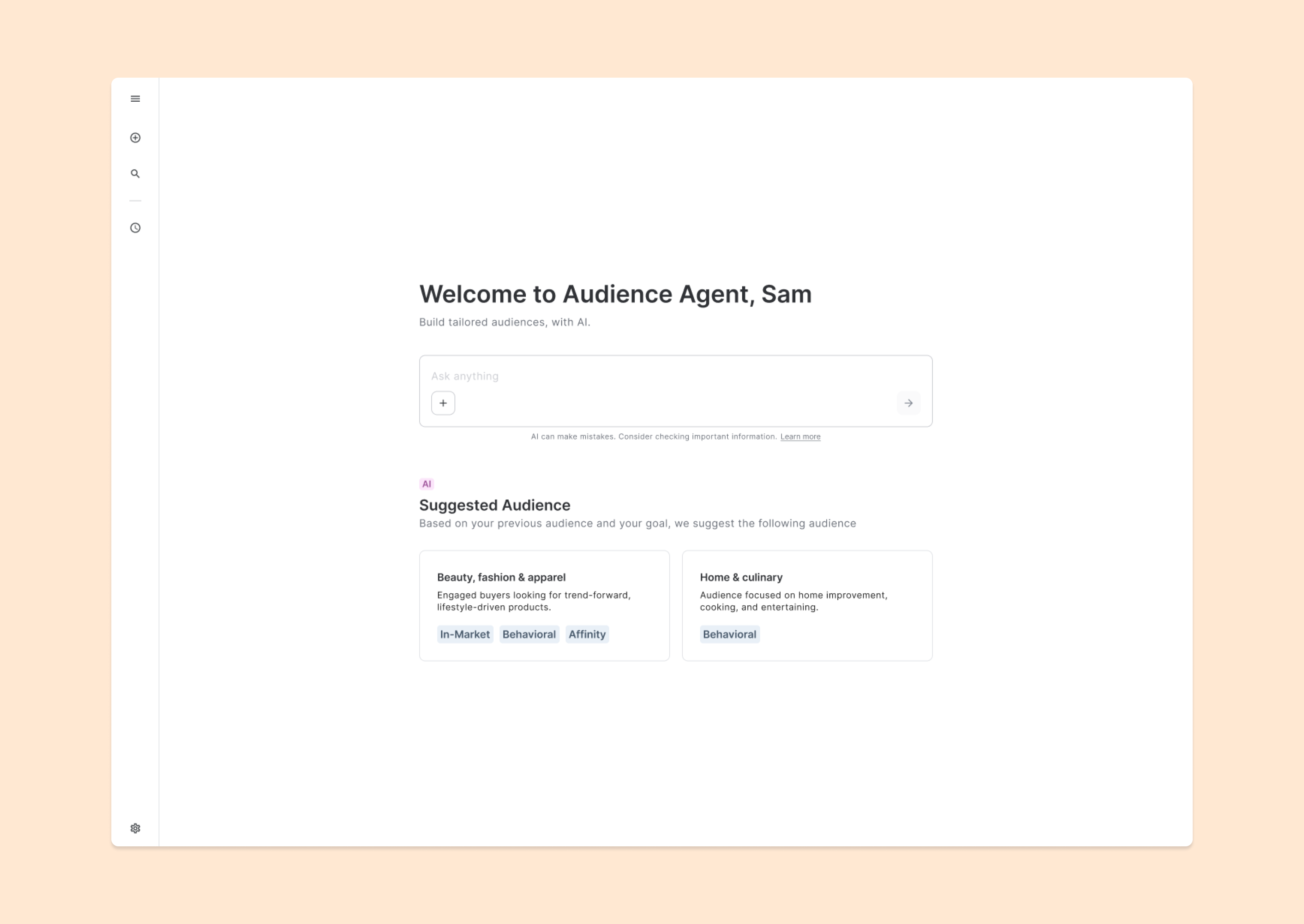
Homepage with Suggested audiences
Aim to reduce back and forth between clients and Criteo and to promote potential high performance audiences.
The user can start with a suggested audience of explore insights by prompting.
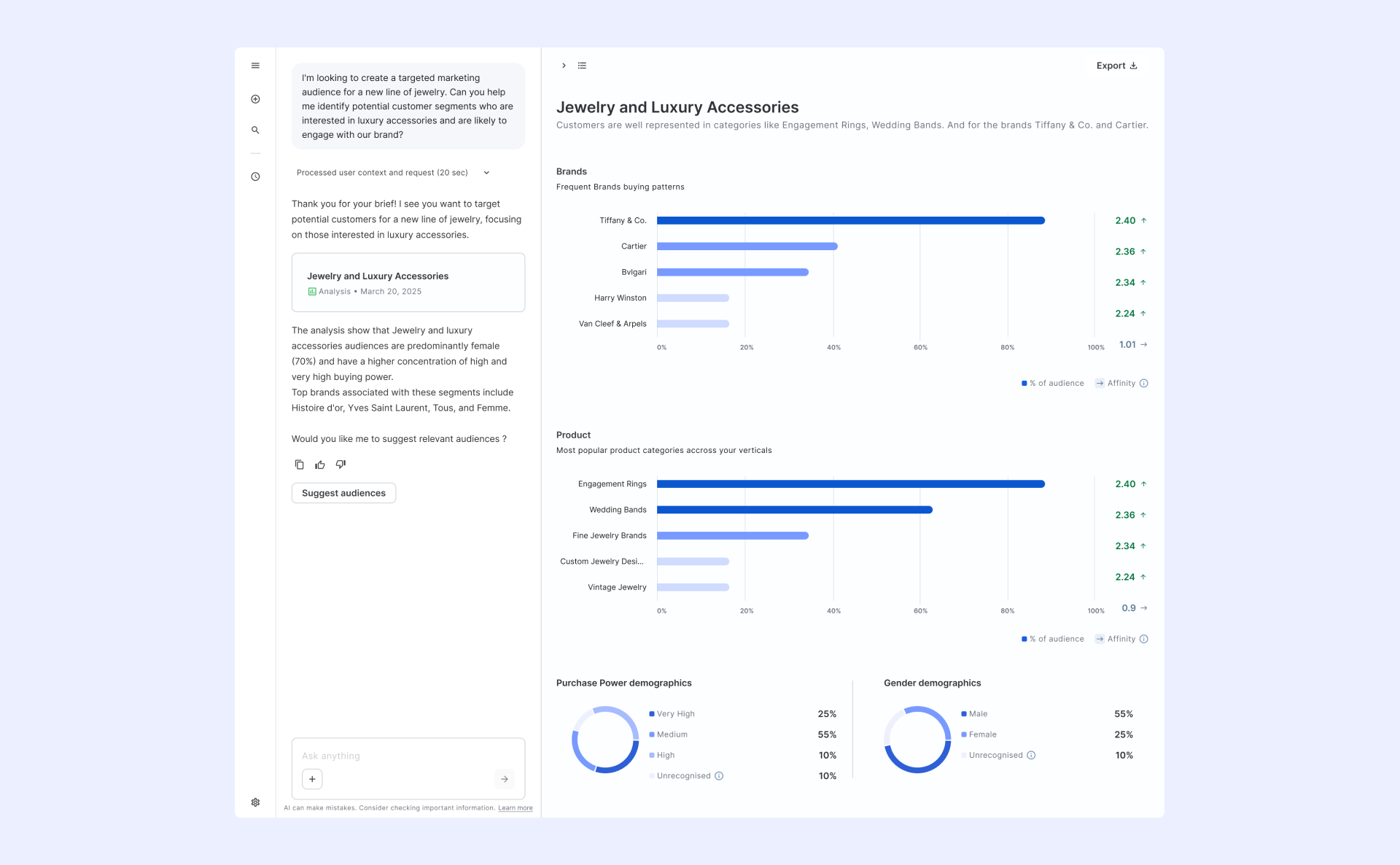
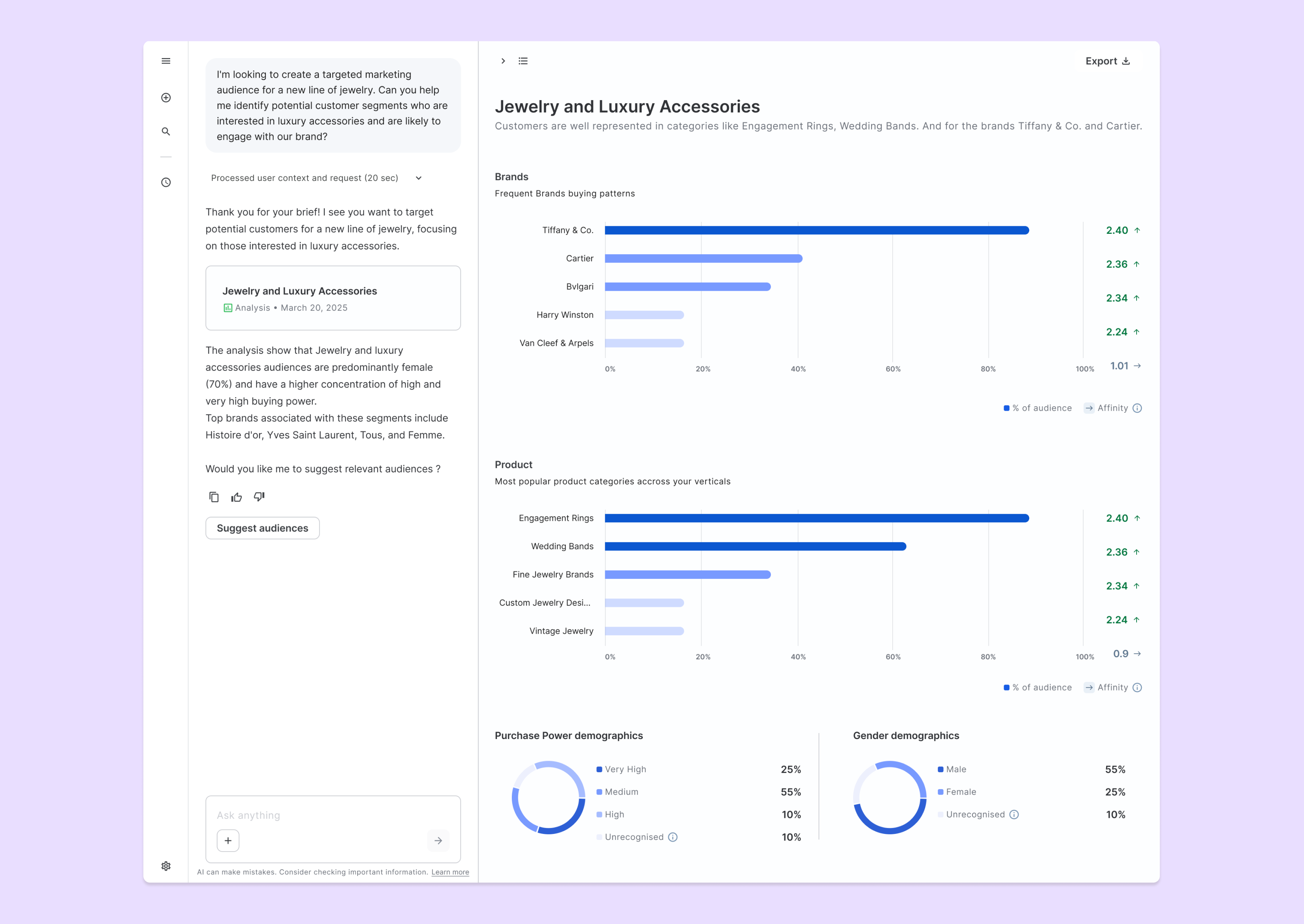
Affinity analysis
Allow the user to gain confidence by crossing the prompt, criteo’s data and the user data.Show - Popular brands and products categories for the brief that have affinity with the current audience.- Segmentations demographics.
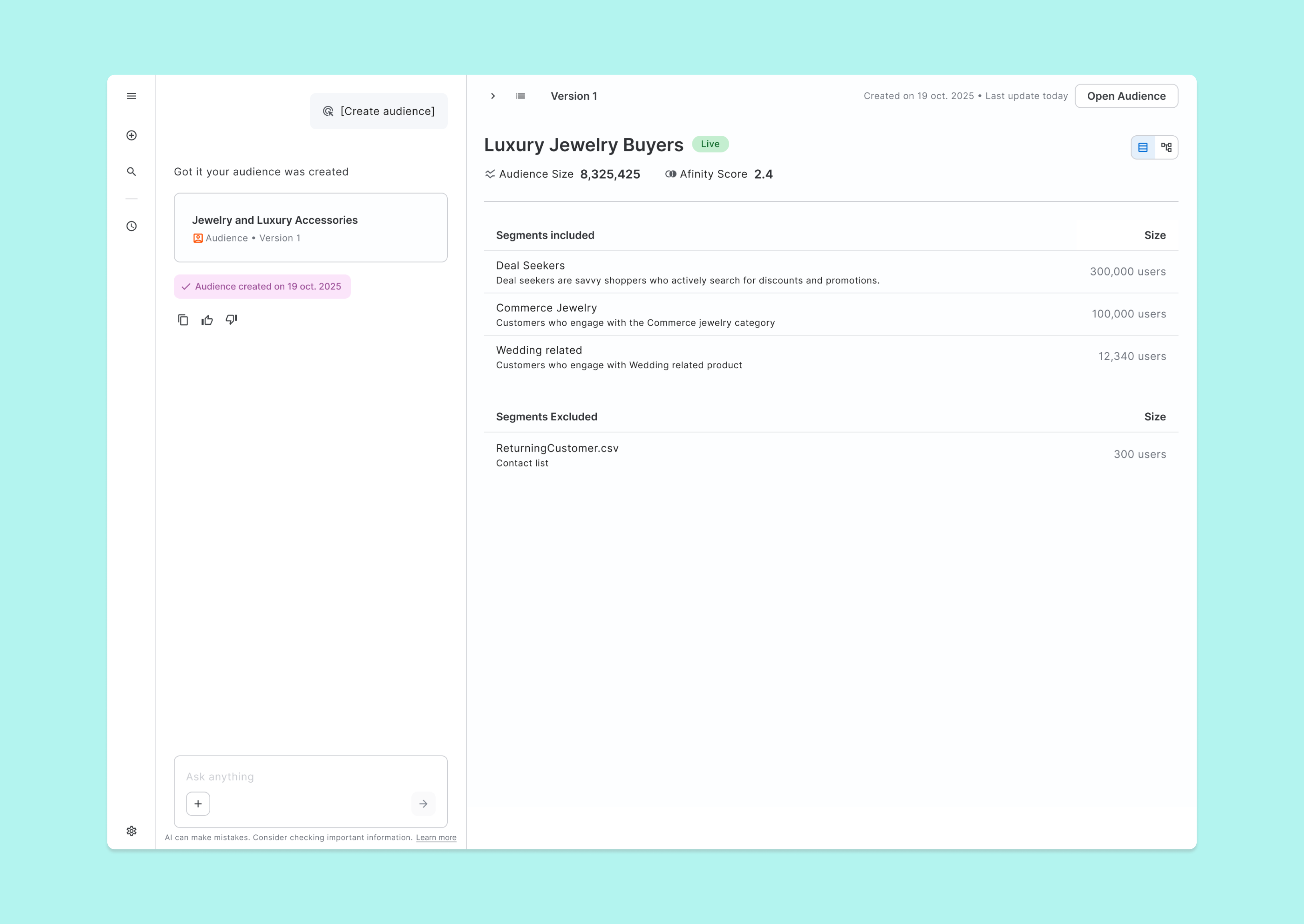
Audience & Segmentation Creation
Automatically create or reuse segments with appropriate size and affinity. Combine them with algebra into an audience.
Once the audience is created, this artefact can be reused to create futures audiences.
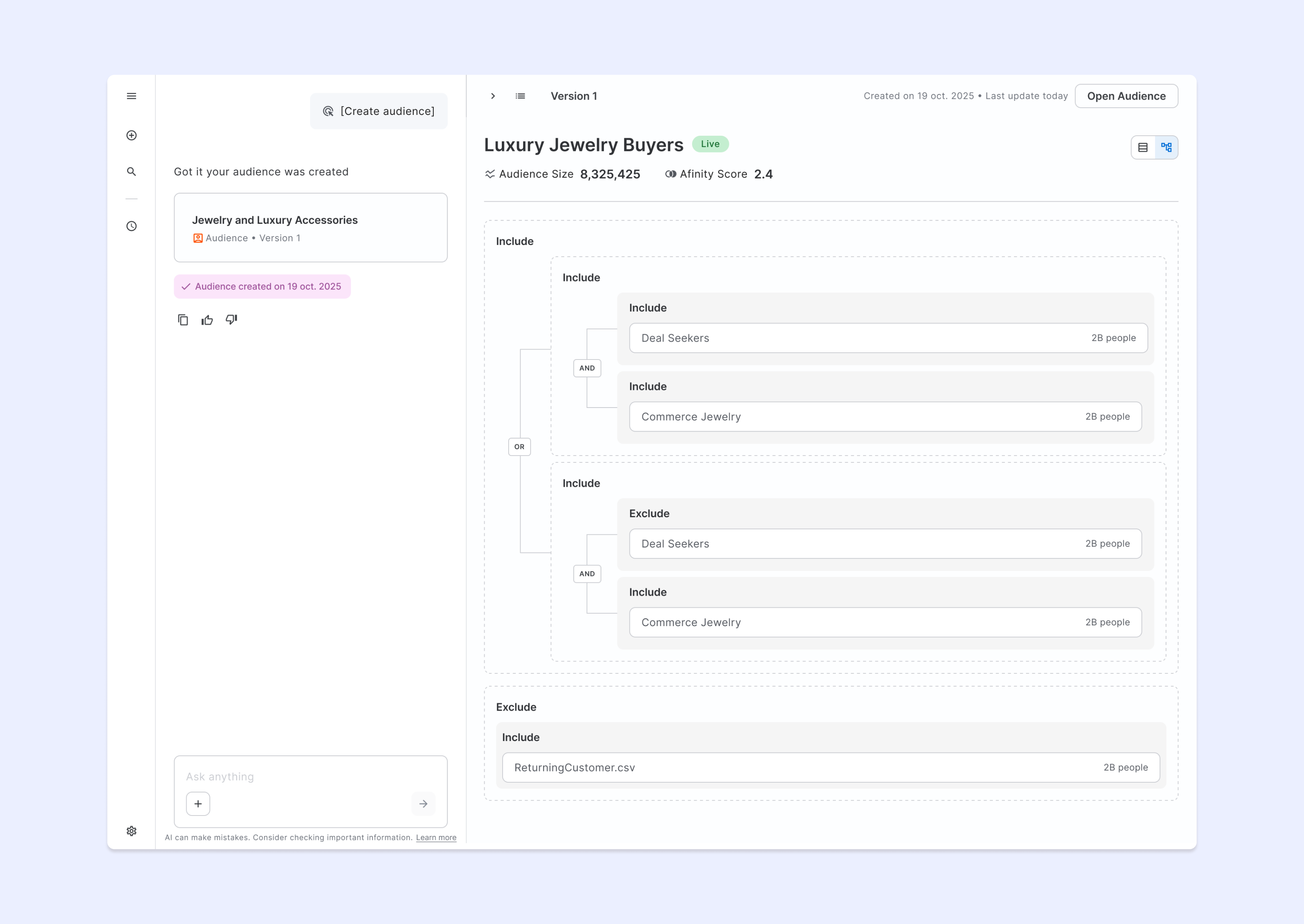
Advanced Algebra display
Allow advanced users to visually confirm the algebra by showing how the segments are interconnected (with OR/AND logic).
Reusable components
I designed 10+ components to be reused across the others criteo agents.
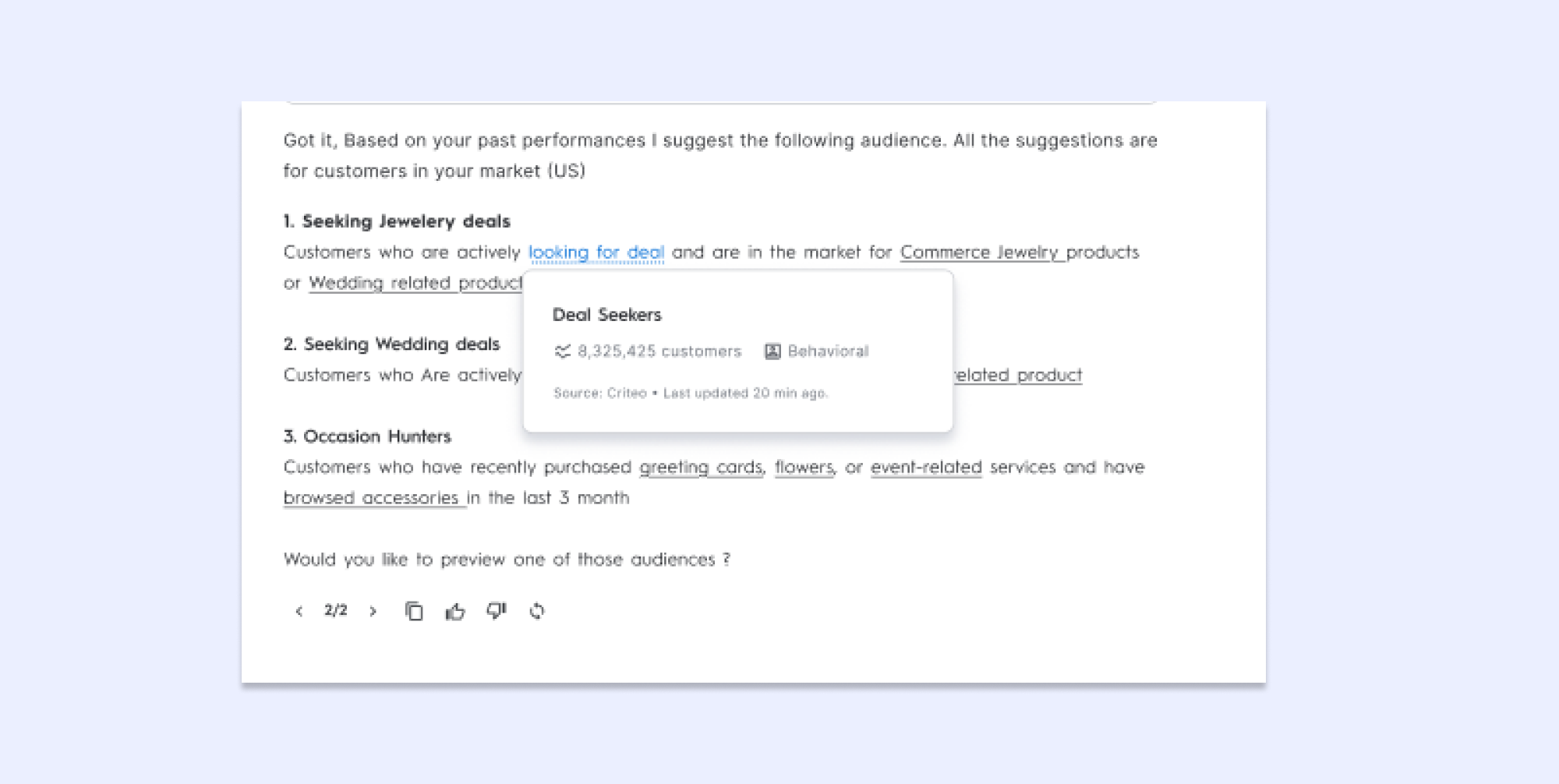
Here’s 2 examples:
Audience selector
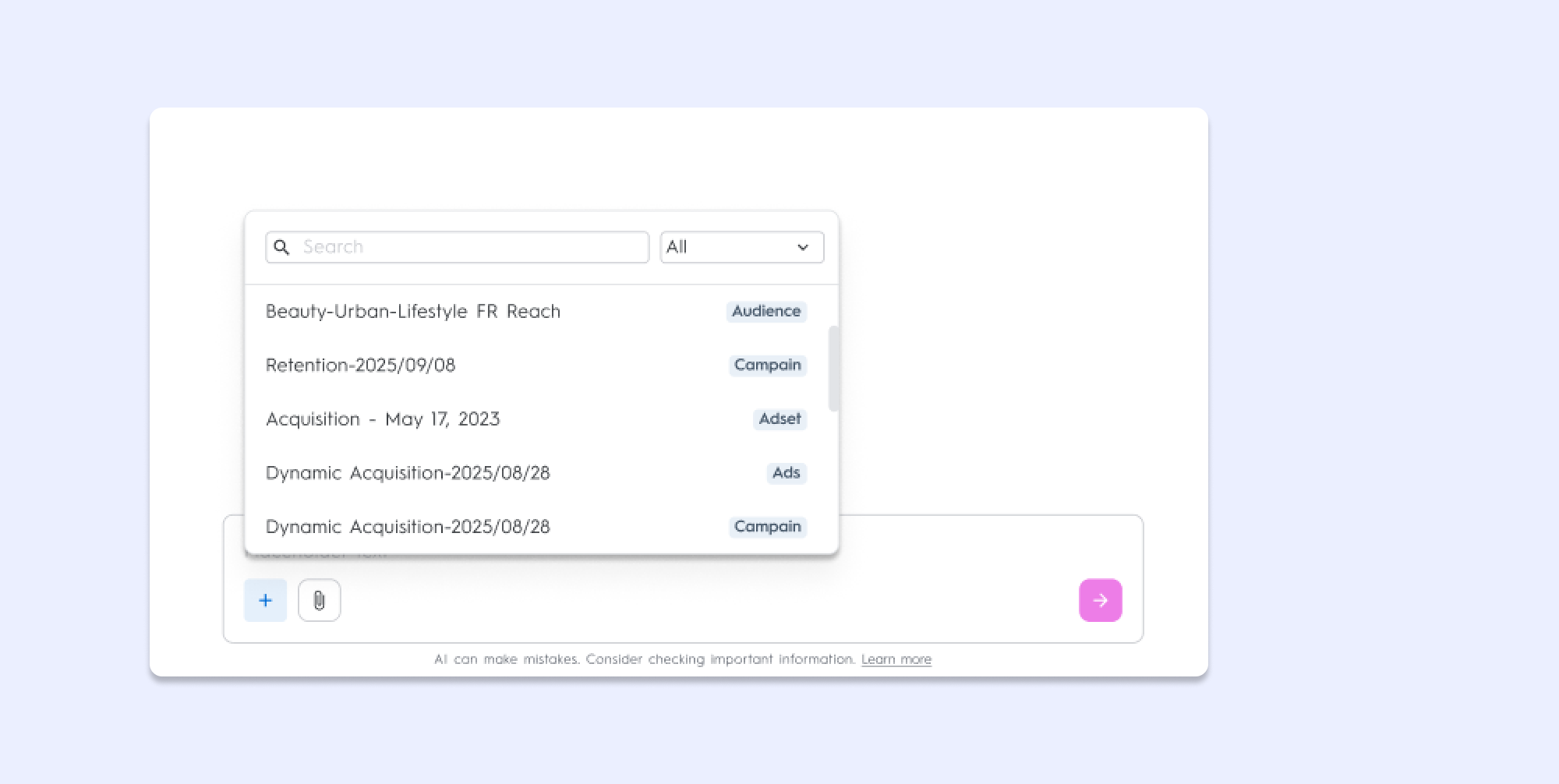
Source on hover
Outcomes
6
Markets where the agent was recently deployed:US, Canada, UK, Ireland, New Zealand, Australia.
+10
Components added to the design system to be reused in others agentic products.
~65%
Internals users of Audience at Criteo declaring that it would help them.
Key learnings
Look for the long term picture
Design for the best helped raised the bar of quality on the components and to bring everyone around the table. It’s especially important when working on an innovation project. Having the target design and components also helped a tons with prioritizing what should go or not into the MPV.
Principles and Heuristics
To cut trough the noise, it’s very important to lay out how we want to experience to feel like. Deciding early on heuristics and Design principles helped me stay on track while crafting the journey.
Build as a team
What helped a lot was to centralize the knowledge and to be sure to share our progress on all the front. Staying in sync with slack and dedicated meetings allowed us to make sure that the vision was shared across everyone.
I could not have worked on this without the amazing design and R&D teams at Criteo, so I’d like to end this case study by thanking the teams for their patience and for trusting me with this project
Criteo
AI Marketing Assistant
Adtech
AI
Conversational design
Criteo is a leader in targeted online advertising; their added value lies in audience monetization with an extremely complex algorithm that intelligently identifies consumers. The agent I worked on allows for the creation of sophisticated audiences, enabling brands to precisely target consumers suited to their offerings.
Role
I was the Product designer in charge of the full project.
Tasks
I conducted workshops, mapped the current user experience, created prototype and designed the full experience.
Team
On the Design side, I worked with a user researcher, a content designer and a Design System designer On the Product Side I worked with 2 PM
For the MVP I worked hand in hand with a team of ~8 developers
AI Use
Claude - BenchmarkMarvin AI - synthetizes user interview and surface Insight
NotebookLM/Napkin AI - field exploration
Google Stitch - components ideation
Repplit - early prototype and concept testing
Discovery
We started by interviewing Criteo marketing experts to understand their workflow. Our users were already using LLM tools to get new ideas for their campaigns but it was not linked to Criteo’s Data. Digging into the data we identified a core opportunity around enabling new segment ideas for marketers: While users reported a high satisfaction with the current audience tool, the data showed that it was not used to it full potential; users would often stick with simpler audiences to avoid the complexity of the tools.
Mapping “Note-n-Map”
Borrowing from the excellent article of Steph Cruchon I led a workshop to build a cross functional story mapping. This allowed us to clearly layout the process of building the audience from the brief to the client receiving the ads.
Early sketchs
3 main layouts where prioritized
Landing page
The goal of this page was to clarify what the agent could and could not do, and to encourage users to explore the tool
Entry point
The agent needed to be on the critical path of the users to ensure easy adoption
Advanced layout
To bring the conversation to life, we aimed for a generative layout that would carry graphics and visualization enabling a back and forth with users
Mockups
Homepage with Suggested audiences
Aim to reduce back and forth between clients and Criteo and to promote potential high performance audiences.
The user can start with a suggested audience of explore insights by prompting.
Affinity analysis
Allow the user to gain confidence by crossing the prompt, criteo’s data and the user data.Show - Popular brands and products categories for the brief that have affinity with the current audience.- Segmentations demographics
Audience & Segmentation Creation
Automatically create or reuse segments with appropriate size and affinity. Combine them with algebra into an audience.
Once the audience is created, this artefact can be reused to create futures audiences.
Advanced Algebra display
Allow advanced users to visually confirm the algebra by showing how the segments are interconnected (with OR/AND logic).
Reusable components
I designed 10+ components to be reused across the others criteo agents.
Here’s 2 examples:
Audience selector
Source on hover
Outcomes
6
Markets where the agent was recently deployed:US, Canada, UK, Ireland, New Zealand, Australia.
+10
Components added to the design system to be reused in others agentic products.
~65%
Internals users of Audience at Criteo declaring that it would help them.
Key learnings
Look for the long term picture
Design for the best helped raised the bar of quality on the components and to bring everyone around the table. It’s especially important when working on an innovation project. Having the target design and components also helped a tons with prioritizing what should go or not into the MPV.
Principles and Heuristics
To cut trough the noise, it’s very important to lay out how we want to experience to feel like. Deciding early on heuristics and Design principles helped me stay on track while crafting the journey.
Build as a team
What helped a lot was to centralize the knowledge and to be sure to share our progress on all the front. Staying in sync with slack and dedicated meetings allowed us to make sure that the vision was shared across everyone.
I could not have worked on this without the amazing design and R&D teams at Criteo, so I’d like to end this case study by thanking the teams for their patience and for trusting me with this project
Criteo
AI Marketing Assistant
Adtech
AI
Conversational design
Criteo is a leader in targeted online advertising; their added value lies in audience monetization with an extremely complex algorithm that intelligently identifies consumers. The agent I worked on allows for the creation of sophisticated audiences, enabling brands to precisely target consumers suited to their offerings.
Role
I led the Product design for the full project.
Tasks
I conducted workshops, mapped the current user experience, created prototype and designed the full experience.
Team
On the Design side, I worked with a user researcher, a content designer and a Design System designer On the Product Side I worked with 2 PM
For the MVP I worked hand in hand with a team of ~8 developers
AI Use
Claude - BenchmarkMarvin AI - synthetizes user interview and surface Insight
NotebookLM/Napkin AI - field exploration
Google Stitch - components ideation
Repplit - early prototype and concept testing
Discovery
We started by interviewing Criteo marketing experts to understand their workflow. Our users were already using LLM tools to get new ideas for their campaigns but it was not linked to Criteo’s Data. Digging into the data we identified a core opportunity around enabling new segment ideas for marketers: While users reported a high satisfaction with the current audience tool, the data showed that it was not used to it full potential; users would often stick with simpler audiences to avoid the complexity of the tools.
Mapping “Note-n-Map”
Borrowing from the excellent article of Steph Cruchon I led a workshop to build a cross functional story mapping. This allowed us to clearly layout the process of building the audience from the brief to the client receiving the ads.
Early Layouts
3 main layouts where prioritized
Landing page
Simple onboarding, augmented with AI suggested Audience
Entry point
An additional option in the current Campain creation to point to the agent to drive it’s adoption
Advanced layout
2 generative layout to carry data visualization and audience creation
Mockups
Homepage with Suggested audiences
Aim to reduce back and forth between clients and Criteo and to promote potential high performance audiences.
The user can start with a suggested audience of explore insights by prompting.
Affinity analysis
Allow the user to gain confidence by crossing the prompt, criteo’s data and the user data.Show - Popular brands and products categories for the brief that have affinity with the current audience.- Segmentations demographics
Audience & Segmentation Creation
Automatically create or reuse segments with appropriate size and affinity. Combine them with algebra into an audience.
Once the audience is created, this artefact can be reused to create futures audiences.
Advanced Algebra display
Allow advanced users to visually confirm the algebra by showing how the segments are interconnected (with OR/AND logic).
Reusable components
I designed 10+ components to be reused across the others criteo agents.
Here’s 2 examples:
Audience selector
Source on hover
Outcomes
6
Markets where the agent was recently deployed:US, Canada, UK, Ireland, New Zealand, Australia.
+10
Components added to the design system to be reused in others agentic products.
~65%
Internals users of Audience at Criteo declaring that it would help them.
Key learnings
Look for the long term picture
Design for the best helped raised the bar of quality on the components and to bring everyone around the table. It’s especially important when working on an innovation project. Having the target design and components also helped a tons with prioritizing what should go or not into the MPV.
Principles and Heuristics
To cut trough the noise, it’s very important to lay out how we want to experience to feel like. Deciding early on heuristics and Design principles helped me stay on track while crafting the journey.
Build as a team
What helped a lot was to centralize the knowledge and to be sure to share our progress on all the front. Staying in sync with slack and dedicated meetings allowed us to make sure that the vision was shared across everyone.
I could not have worked on this without the amazing design and R&D teams at Criteo, so I’d like to end this case study by thanking the teams for their patience and for trusting me with this project